-
-
-
Devices

-
Plans
-
Promotions
-
-
-
Plans
-
Promotions
-
More from Home Broadband
-
What’s popular
-
-
-
Postpaid Roaming
-
Prepaid Roaming
-
For Tourists
-
IDD
-
What’s Popular
-
-
-
Entertainment
-
Finance
-
Security
-
Direct Carrier Billing
-
-
-
Brands
-
Prepaid
-
Lifestyle and more
-
-







Introducing Home Energy Management System (HEMS): Your Smart Energy Companion
Setting up your Smart Home system
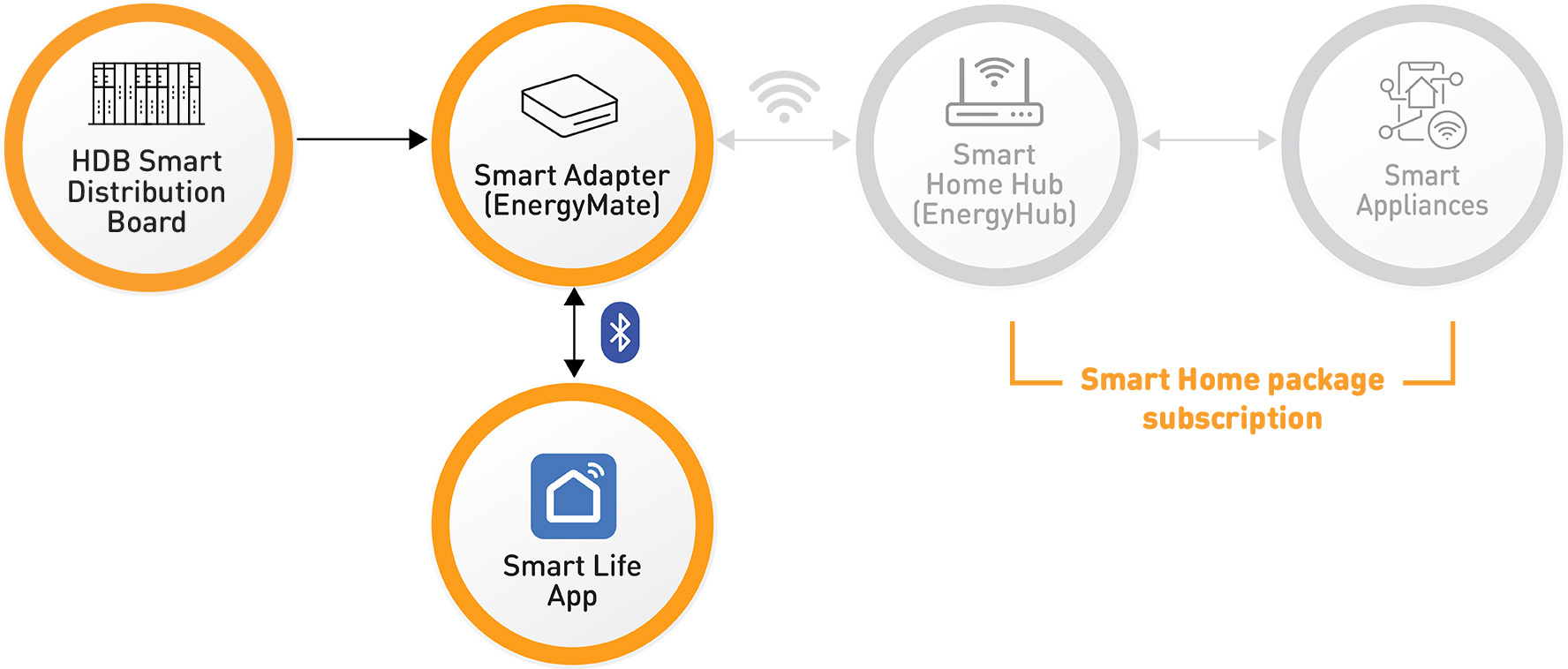
Your flat comes equipped with a Smart Distribution Board (Smart DB) and a Smart Adapter (EnergyMate) in the service closet, enabling you to monitor the energy consumption of each circuit in your home via the Smart Life App through a Bluetooth connection. This allows you to see which area of your home uses the most electricity, and how much energy is consumed.
How to get started
Download “Smart Life” app.
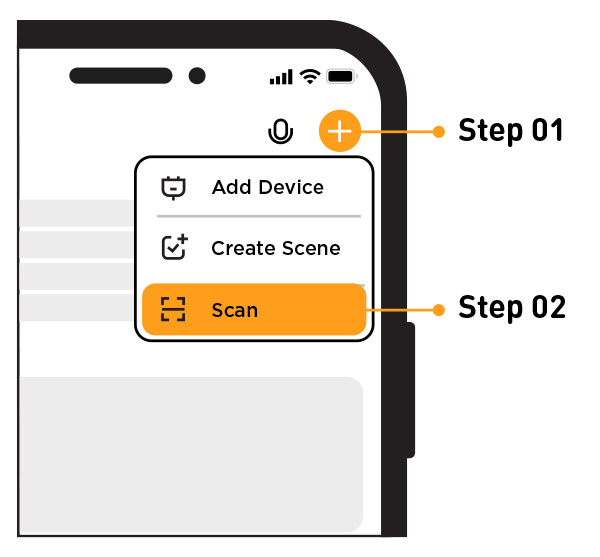
Launch the "Smart Life app"
- Step 1: Tap the “+” icon on the top right of your “Smart Life” app
- Step 2: Tap on “Scan”, scan the QR code on the Smart Adapter located in your service closet
Pair your device and you’re done!
Learn how to pair your Smart Adapter (EnergyMate) here.
Unlock Advanced Energy Monitoring
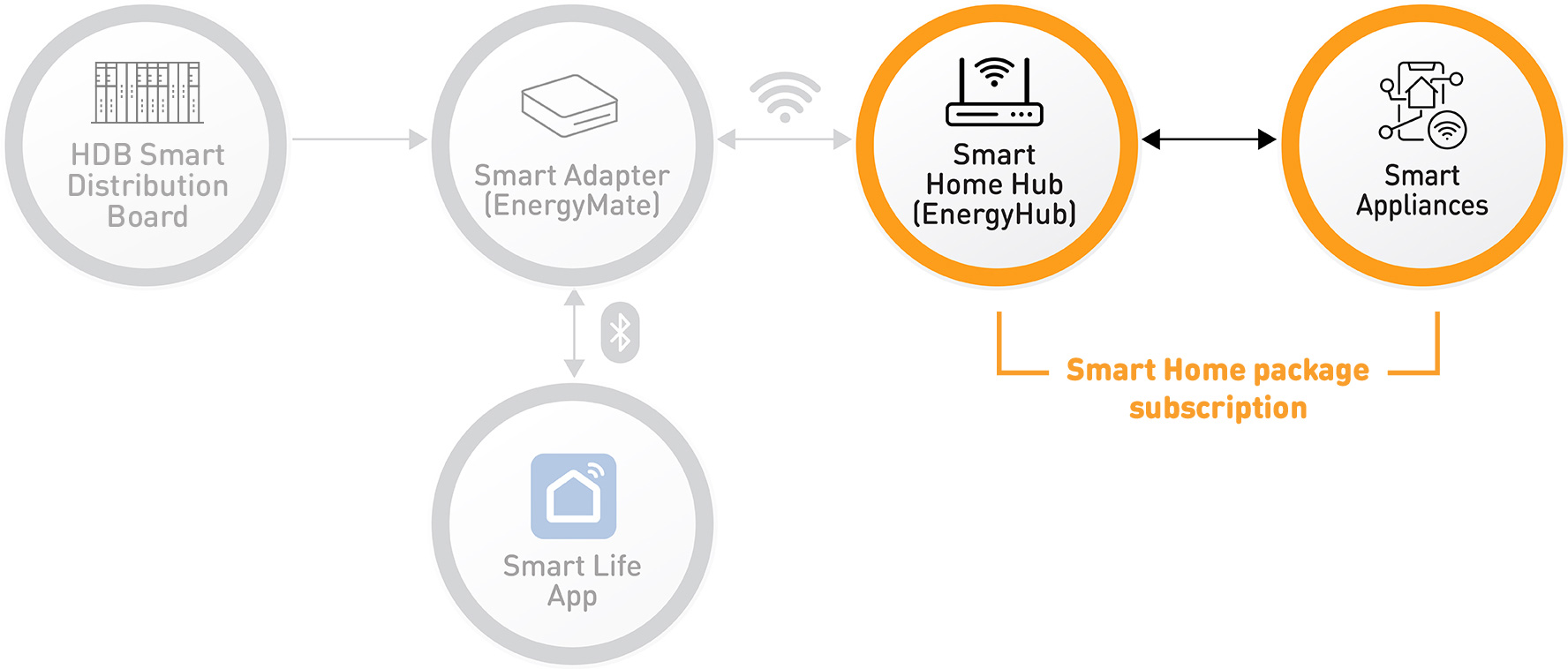
With the Smart Home Hub (EnergyHub), you can access your home energy consumption data remotely and set up automated energy-saving routines for compatible smart appliances*.
Pair it with a Smart Home package subscription to unlock AI features that identify appliances* that are in use – without any additional sensors.
*Features may vary depending on appliance compatibility with EnergyHub
Benefits

See What’s Using Energy
Monitor energy usage, gaining clear insights into where and how electricity is consumed in your home. This visibility empowers you to take actionable steps toward energy savings and usage predictions, leading to potential lower bills and a lighter carbon footprint.

Smarter & Safer with AI
With a Smart Home package subscription, you can access AI-powered features such as appliance-level tracking, alerts for unusual electricity usage, and helpful usage tips. The system learns the appliance energy usage patterns and identifies any out of the norm energy consumption range – such as a fridge using more power than usual or an air conditioner switched on for an unusually long period. The alerts can help to minimise energy wastage, improve safety and enable early detection of potential faults.

Easy Control
All our ONT plans come with the latest Wi-Fi 7 routers or meshes to best suit your home networking needs.
Enjoy control and convenience with our Smart Life app. Access energy data, control appliances remotely, and schedule routines to automate energy-saving behaviours — all from your smartphone.
What do I need to get started?

EnergyHub
Sign up for any featured Smart Home Package and get a free EnergyHub (worth $80).

Smart Home Package Subscription
Subscribe through the Smart Life app.
Special Offer: Enjoy a free 6-month trial, exclusive for Tengah residents!
Smart Home & Energy Management – What You Need & Cost
Applicable for selected HDB projects under the HEMS pilot.
Item | Do I need this? | What it’s for? | Price |
HDB Smart Distribution Board (Smart DB) | Required. Already provided in your home | Enables energy monitoring of household energy usage. | Free |
Smart Adapter (EnergyMate) | |||
Smart Life App | Required | View your home’s energy usage | Free |
Smart Home Hub (EnergyHub) | Optional | Connects your home’s energy data to the cloud, allowing remote access, deeper insights, and enabling advanced features such as AI-powered analysis. | Free with selected Smart Home Packages (tengah-project), $99 (without installation) or $179 (with installation) |
AI-driven insights (NILM) | Optional | Uses AI to identify which appliances are using energy, without additional sensors. Provides alerts for unusual usage (e.g. appliances left on or consuming more than usual), helping you save energy, improve safety, and detect potential issues early. | $5.99/year, inclusive of 6 months free subscription
|